Error: While sending an expense report to Sage, you may get the following error -
Timestamp: 2025-10-07 11:58:02 Category:Sage300 Exception Priority:1 EventId:102 Severity:Critical
Title: Exception while processing Expense Record
Message:Message : ACCPAC.Advantage.SessionException --- > System. Runtime. InteropServices.COMException: Invalid Signon Information.
Make sure you supply the correct User ID and Password
at AccpacCOMSVR.AccpacSvrSessionClass.Open(String UserIdentifier, String Password, String DataBase, DateTime SessionDate, Int32 Flags, String Reserved, Boolean CheckStatus, Byte[]& SessionInfo)
at ACCPAC.Advantage. Server.Session. Open(String userID, String password, String orgID, DateTime sessionDate, Int32 flags, Boolean checkStatus)
--- End of inner exception stack trace ---
at ACCPAC.Advantage.Server.Session.Open(String userID, String password, String orgID, DateTime sessionDate, Int32 flags, Boolean checkStatus)
at ACCPAC.Advantage.Session.Open(String userID, String password, String companyID, DateTime sessionDate, Int32 flags)
at GorillExpense. IntegrationApp.Classes.Sage300InvoiceUpload.Sage300ERPLogin(Session& session, DBLinkFlags dblinkflg, String userid, String password, String companyid)
at GorillExpense. IntegrationApp.Classes.Sage300InvoiceUpload.Sage300ProcessSingleExpense(List'1 ListExpenseInfo, List'1 Listsettings, List'1 ListConfigLabelInfo, Boolean _ValidateOnly)
================================================================================================================================
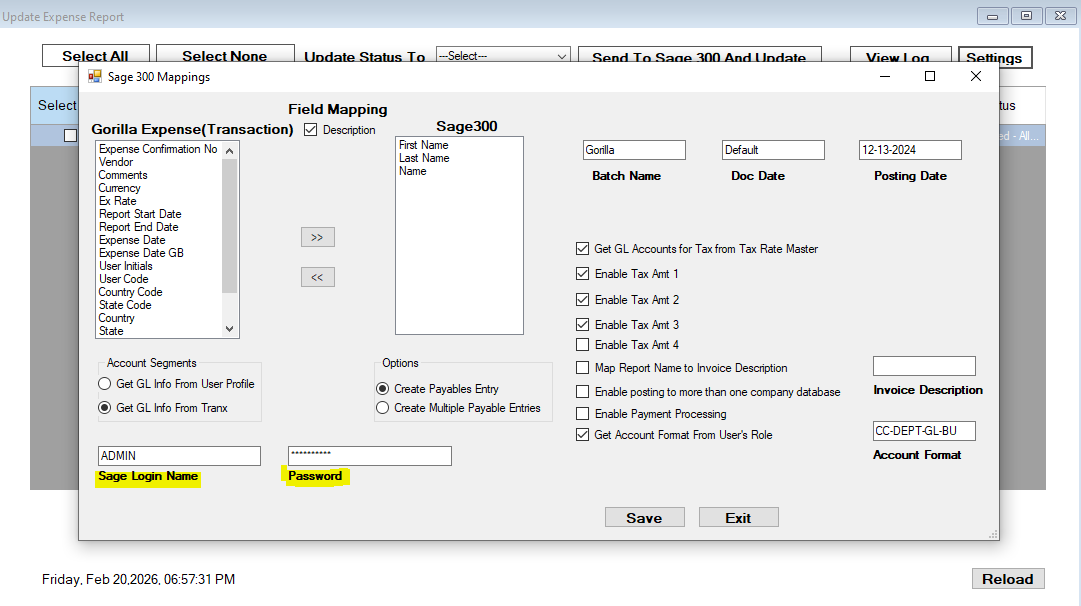
Solution: Please make sure the User ID and Password entered on the Settings screen of the Gorilla Expense Integration App are the same ones you use to log in to Sage. To check this, open the Settings screen in the Gorilla Integration app and verify that the User ID and Password match your Sage login credentials. If necessary, update them and click Save. After saving, close the Gorilla Integration app completely, reopen it, and try sending the expense report again.
Also, make sure the password is entered in all caps. For example, if your Sage password is Sage@2025, enter it as SAGE@2025 in the Integration App Settings screen.
Please refer to the sample screenshot below of the Gorilla Integration App Setting Screen, where you need to enter the credentials.